
AdsPower vs Gologin 2026: Which One is Better for Multi-Account Browser Management?
Take a Quick Look
If you are looking for the best alternative to Gologin, check the detailed comparison 2026 here: AdsPower vs Gologin. This comprehensive guide will help you to choose the best antidetect browser for your business.
Update on 2025-12-24: Updated new information on both browsers and added more dimensions for comparison.
Managing multiple online accounts has become increasingly complex as platforms rely on advanced tracking methods to identify users. Browser fingerprints, device signals, and behavior patterns are now closely monitored, making traditional account switching risky for professionals who operate at scale. To reduce detection risks and maintain account stability, specialized browser fingerprint management tools have become essential.
Two well-known solutions in this space are AdsPower and Gologin. Both provide isolated browser environments designed to help users operate multiple accounts more safely. That said, their similarities are largely surface-level. When examined more closely, the two platforms differ considerably in functionality, workflow efficiency, and suitability for professional use.
This comparison explores how AdsPower and Gologin perform across key areas such as fingerprint control, automation, collaboration, and scalability. It also highlights where AdsPower excels and outlines important capabilities that Gologin does not offer, including iOS device fingerprint simulation, window synchronization, built-in RPA features, and advanced team permission management.
What Are Browser Fingerprint Management Tools?
To understand the differences between these platforms, it helps to first explain what browser fingerprint management tools are and why they are important. When users access websites, a wide range of technical details is collected, including browser type, operating system, installed plugins, time zone, screen resolution, and other device-level signals. Together, these data points form a unique “browser fingerprint” that can identify a user even without relying on cookies.
Major platforms such as Google, Meta, and Amazon actively use fingerprinting systems to monitor activity, enforce platform rules, and detect unusual or linked behavior. For individuals and businesses managing multiple accounts—whether for e-commerce, social media marketing, advertising, or affiliate work—this creates a real risk. Logging into several accounts from the same device often triggers security checks, account limitations, or permanent bans.
Browser fingerprint management tools address this challenge by creating isolated browser environments. Each profile functions as a separate device with its own fingerprint, allowing users to operate multiple accounts more safely, consistently, and efficiently.
Overview: AdsPower vs Gologin
At first glance, AdsPower and Gologin seem similar: both allow you to create separate browser profiles with different fingerprints, proxies, and configurations. But the similarity mostly ends there.
Let’s start with a quick comparison:
|
Feature |
AdsPower |
Gologin |
|
Browser fingerprint masking |
✔️ Advanced |
✔️ Standard |
|
iOS device simulation |
✔️ Yes |
❌ No |
|
Window synchronization |
✔️ Yes |
✔️ Yes |
|
Free RPA support |
✔️ Yes |
❌ No |
|
Multi-user/Team management |
✔️ Flexible |
⚠️ Limited |
|
Supported platforms |
Windows, Mac, Cloud |
Windows, Mac |
|
Proxy integration |
✔️ Yes |
✔️ Yes |
|
Extensions support |
✔️ Yes |
✔️ Yes |
|
Pricing |
Free plan available + paid plans |
Free & paid plans |
|
Paid plan starting price |
From $9/mo |
From $9/mo |
|
Cost-efficiency at scale |
High (flexible profiling, annual discount available) |
Moderate (higher price for more profiles) |
|
User Ratings (Trustpilot) |
4.5 (1087 reviews) |
4.4 (370 reviews) |
Now, let's unpack these features in depth and explore why AdsPower is often preferred for more demanding use cases.
Fingerprint Customization and Profile Realism
Both AdsPower and Gologin allow users to customize browser fingerprints, including:
- User agent and browser version
- Screen resolution and fonts
- Time zone and language
- WebRTC, Canvas, and WebGL parameters
For basic multi-account separation, both platforms perform reliably when combined with quality proxies and realistic user behavior.
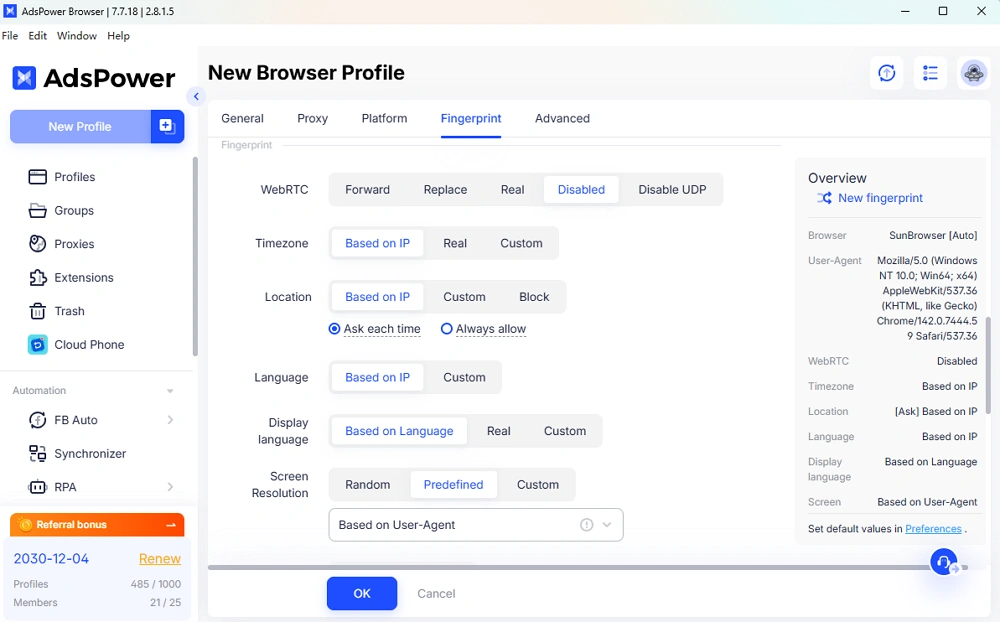
However, AdsPower offers deeper and more flexible fingerprint control, especially when managing large numbers of profiles. Users can create reusable templates and apply consistent fingerprint logic across entire batches, which is particularly useful for teams and agencies.
Mobile and iOS Device Simulation
One of the most significant functional differences lies in mobile fingerprint support.
AdsPower
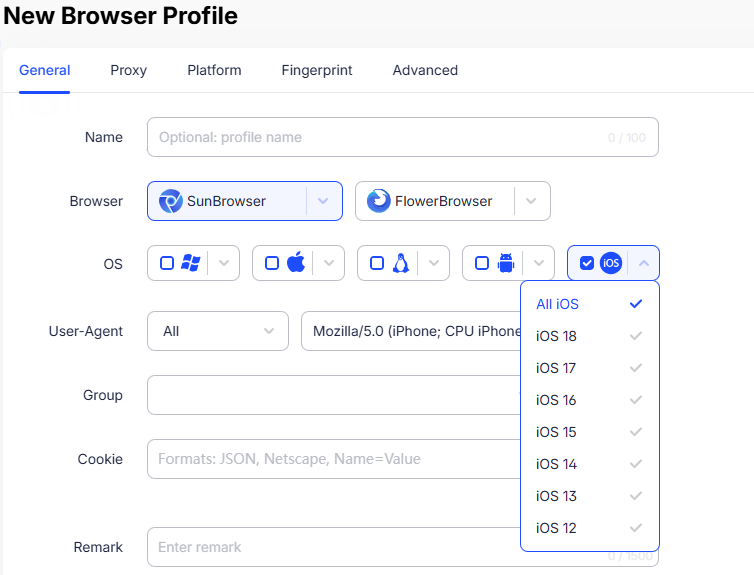
AdsPower supports mobile device fingerprints, including iOS simulation. This allows browser profiles to behave like real iPhones or iPads, which is valuable because:
- Many platforms treat mobile and desktop traffic differently
- Mobile environments often face different detection thresholds
- iOS fingerprints are harder to replicate convincingly
This feature makes AdsPower more suitable for mobile-centric workflows.
Gologin
Gologin does not support iOS device fingerprint simulation. Profiles are desktop-based, which limits flexibility for users who need to appear as mobile users.
Window Synchronization: Working at Scale
When managing dozens of accounts, manual repetition becomes inefficient.
AdsPower
AdsPower includes a multi-window synchronizer feature that allows users to:
- Control multiple browser profiles simultaneously
- Perform the same actions across many sessions at once
- Significantly reduce repetitive manual work
This is especially useful for tasks like logging in, navigating dashboards, or performing routine actions across several accounts.
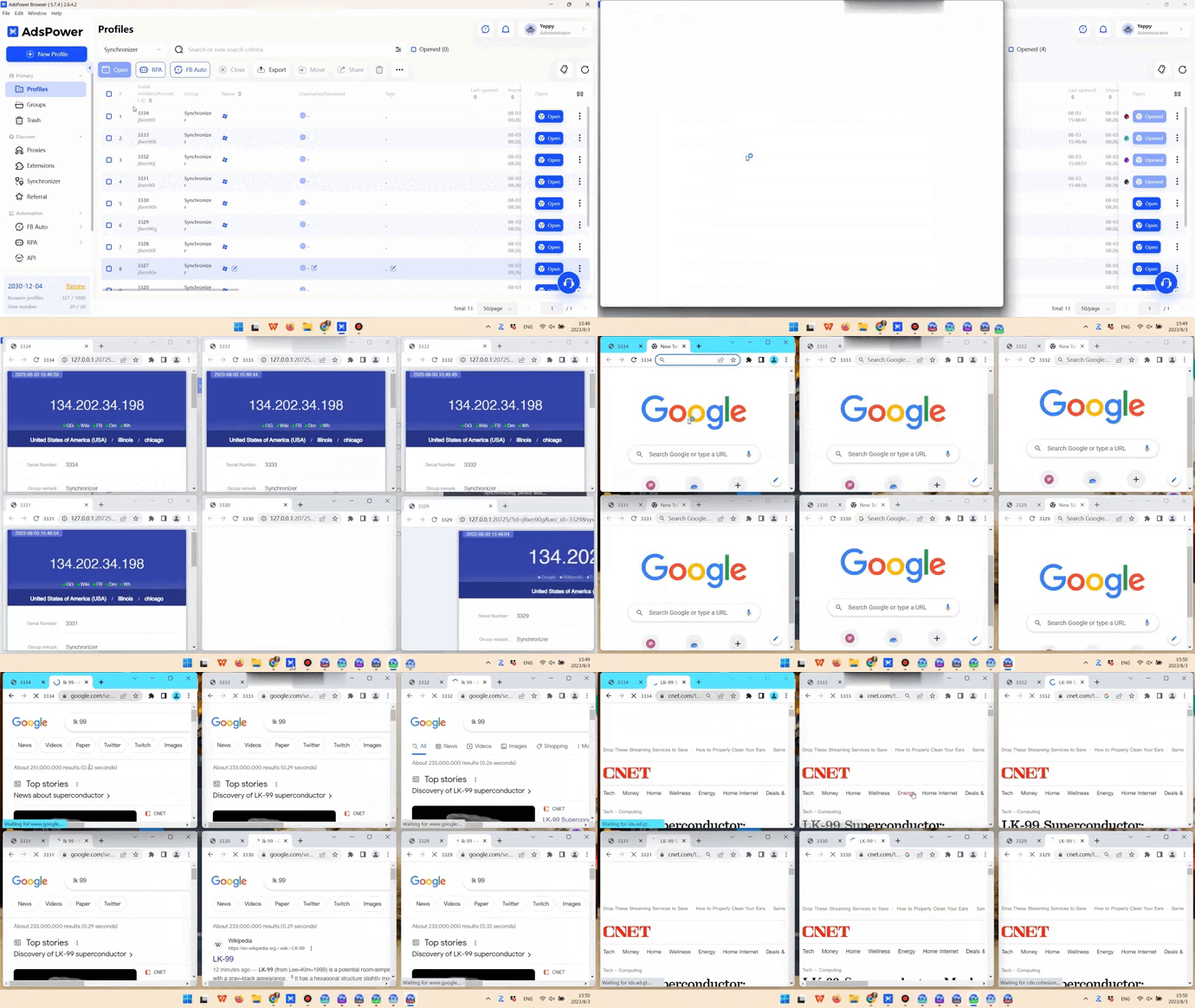
(The Synchronizer enables you to effortlessly carry out identical tasks across all profiles)
Gologin
Gologin provides a window synchronization feature; however, its implementation is less stable and less reliable in large-scale or long-running sessions. In practice, many users still need to operate browser profiles individually or rely on external automation tools to maintain consistency across multiple sessions.
For small setups or light usage, this limitation may not be noticeable. As the number of active profiles increases, however, synchronization instability can reduce efficiency and create workflow friction compared to more robust solutions.
Automation and RPA Capabilities
Automation is a key factor for teams that run repetitive workflows daily.
AdsPower
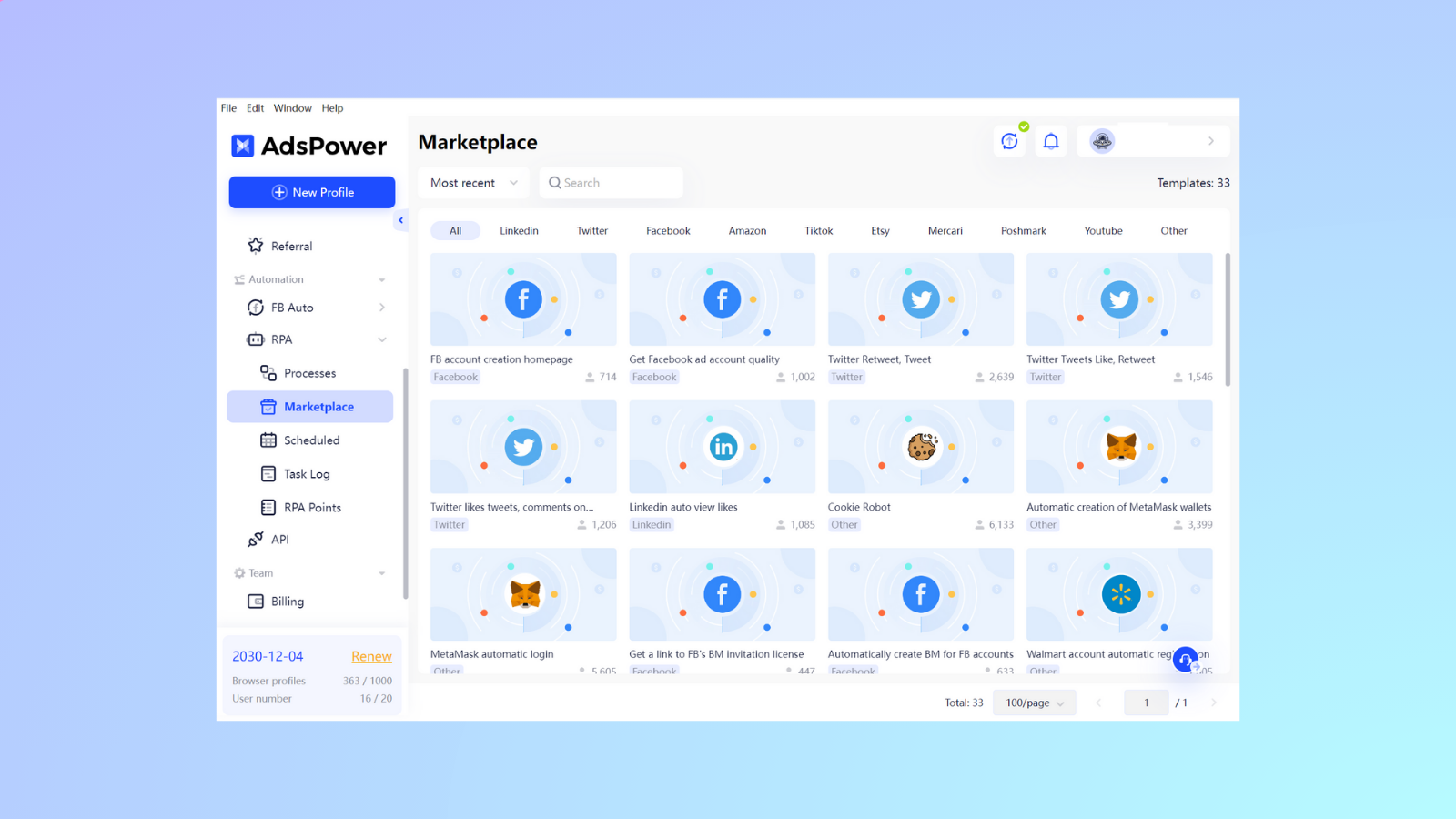
AdsPower provides built-in RPA (Robotic Process Automation) and RPA Plus features, allowing users to:
- Select the ready-made templates to manage your daily operations
- Automate repetitive tasks without heavy coding
- Run workflows across multiple profiles at one time
- Schedule your tasks freely
- Craft your own custom workflows based on your demands
This native automation reduces reliance on third-party tools and lowers the technical barrier for scaling operations.
Gologin
Gologin does not include free RPA functionality. Automation typically requires:
- External scripting tools
- Additional integrations
- More technical setup and maintenance
While possible, this approach is less convenient for non-technical users.
Team Collaboration and Permission Management
For agencies and organizations, managing who can access what is critical.
AdsPower
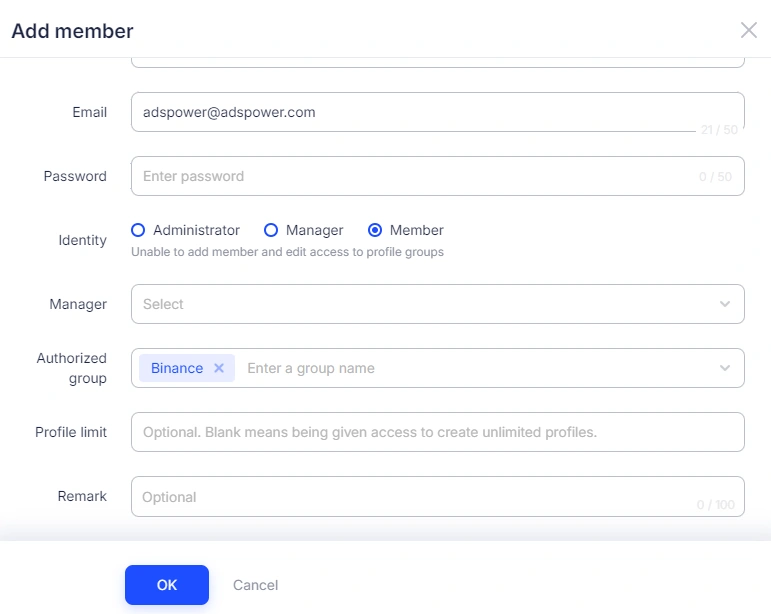
AdsPower offers granular team permission controls, including:
- Role-based access levels
- Profile-specific permissions
- Activity logs and accountability tracking
- Secure profile sharing
This makes AdsPower well-suited for structured teams with multiple roles.
Gologin
Gologin supports team access and profile sharing, but with more limited permission flexibility. For small teams, this may be sufficient, but it offers less control for complex organizational structures.
Data privacy and security
AdsPower
AdsPower supports Two-Factor Authentication (2FA) for enhanced account security. Set up 2FA using authenticator, email address, or SMS.
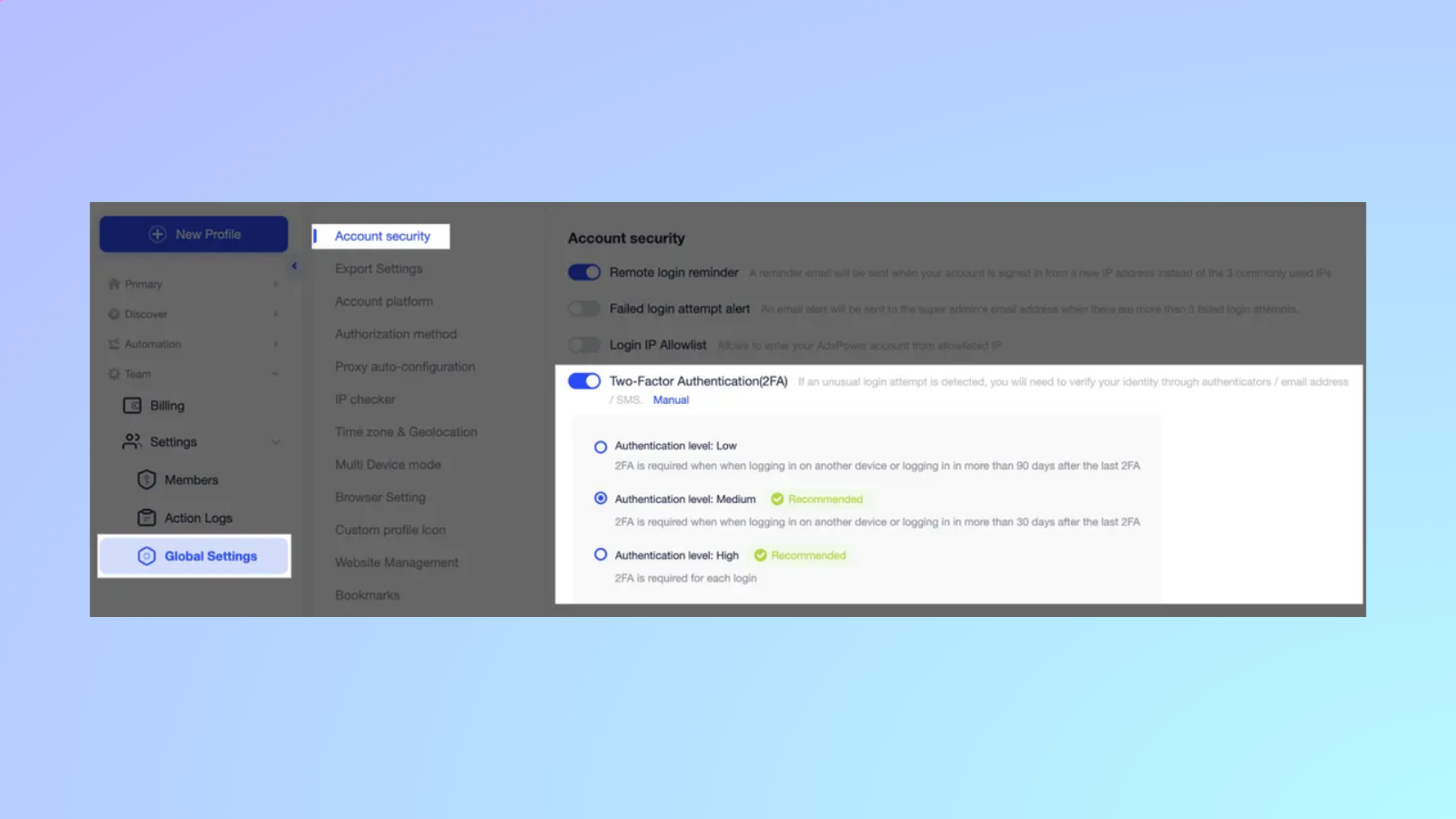
2FA is not the only security measure in place. We also provide a Remote Login Reminder and a Failed Login Attempt Alert to notify users of any suspicious activity on their accounts. Additionally, AdsPower allows you to set your own Login IP Allowlist, giving you control over which IP addresses can access your account.
While we prioritize data privacy and do not actively collect user data, we offer data synchronization and cloud storage options for convenient access and sharing of data among team members.
Gologin
Gologin supports two-step verification, but it does not have additional settings for security levels.
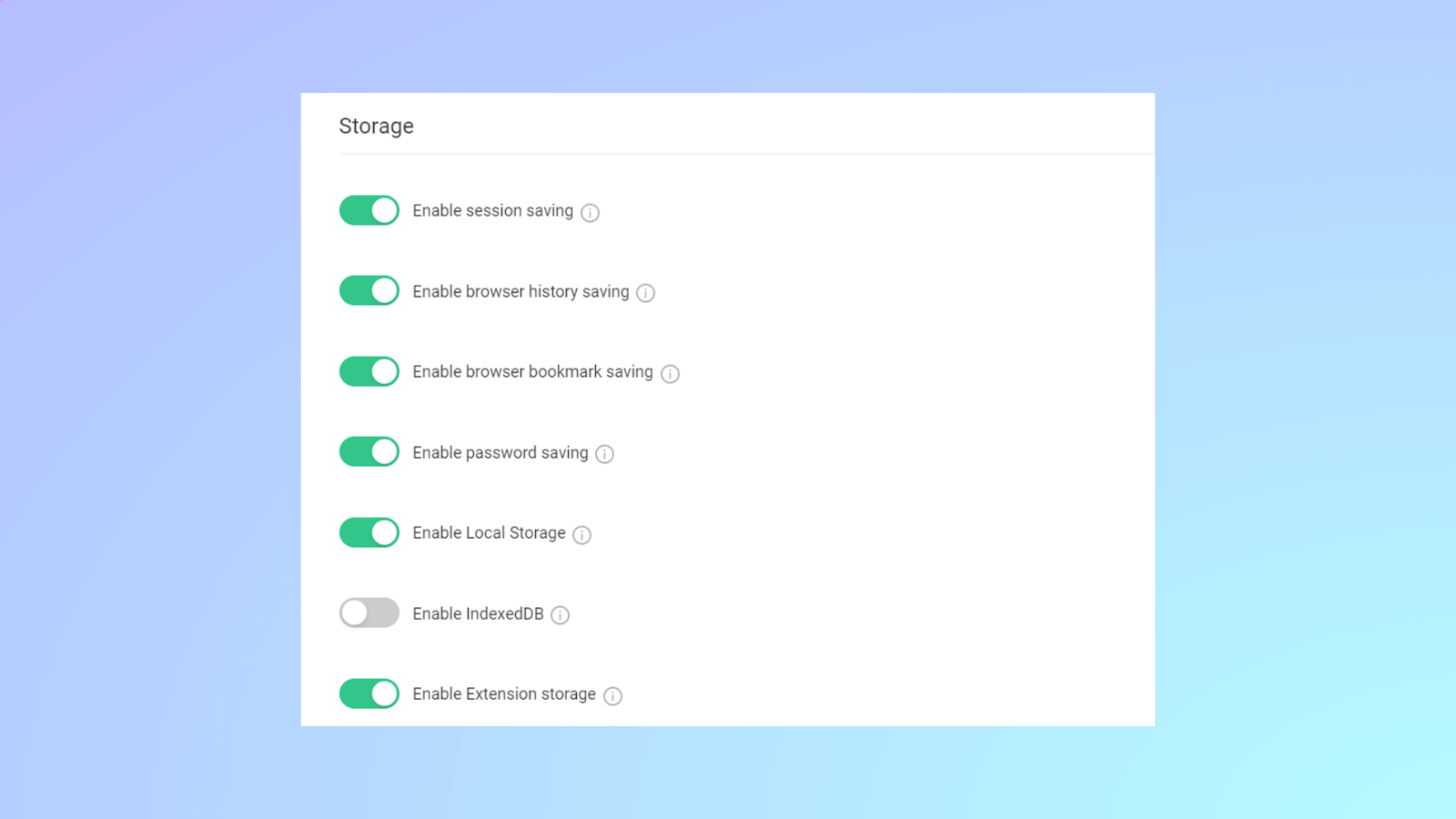
Storage settings can be manually changed in the GoLogin app, but we cannot guarantee that this operation is 100% secure and free from data leaks.
Pricing and Long-Term Value
Pricing should be evaluated based on what you get for the money, not just the monthly cost.
AdsPower
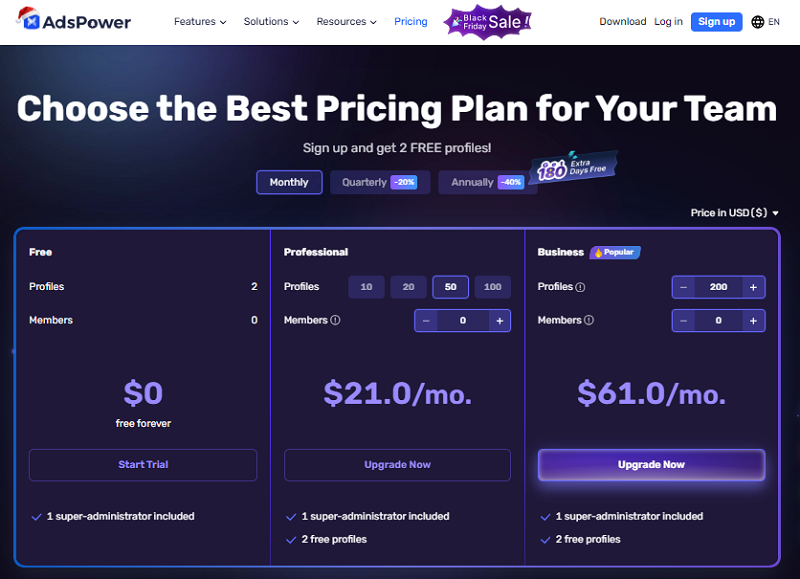
AdsPower offers:
- A lifetime free plan for 2 profiles
- Flexible paid plans that scale gradually
- Advanced features are included without relying on external tools
Because AdsPower bundles automation, synchronization, mobile simulation, and team controls into its ecosystem, users often save money by not needing additional software.
Bonus: Get an extra 5% off on any subscription plan here >>
Gologin
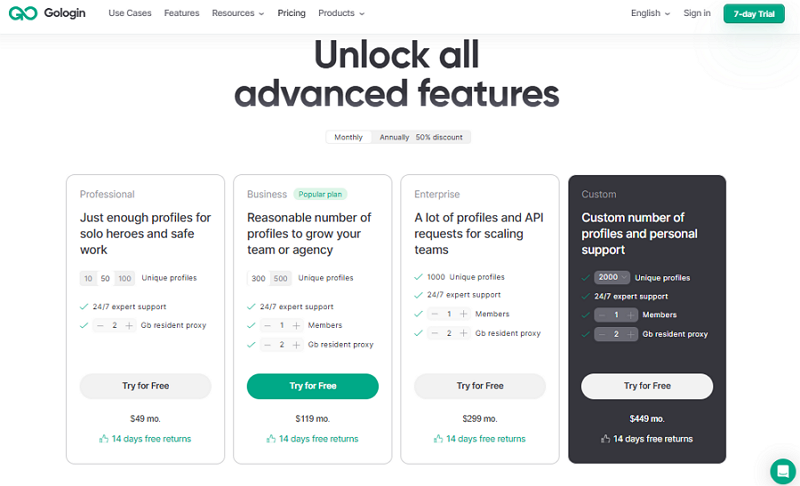
Gologin uses fixed pricing tiers. While straightforward, this model can become less cost-efficient as needs grow, especially when users must upgrade to higher tiers to unlock capacity rather than features.
For example, when you choose the 50-profile plan, AdsPower will cost $21/mo. while Gologin will cost $49/mo. Overall, AdsPower tends to deliver better long-term value, particularly for users who plan to scale.
Who Should Choose Which?
Choosing between AdsPower and Gologin ultimately comes down to how complex your workflows are today and how much you plan to scale in the future. While both tools serve the purpose of browser fingerprint isolation, they are designed for different user profiles and operational needs.
If your work involves managing many accounts, coordinating with a team, or automating repetitive tasks, you will benefit from a more powerful and flexible platform. On the other hand, if your setup is simple and you value ease of use over advanced features, a lighter solution may be enough.
Choose AdsPower if you:
AdsPower is better suited for professional, high-volume, and growth-oriented operations. It is an ideal choice if you:
- Manage a large number of accounts across platforms such as e-commerce, advertising, or social media
- Need Android or iOS fingerprint simulation to appear as real mobile users and reduce detection risks
- Rely on automation or repetitive workflows, where manual actions would be time-consuming and inefficient
- Work with teams or agencies and require strict, role-based permission control and activity tracking
- Plan to scale operations long term and want a tool that grows with your business rather than limiting it
AdsPower is designed for users who treat multi-account management as a serious operation and need efficiency, control, and scalability built into their daily workflows.
Choose Gologin if you:
Gologin is a good fit for simpler, smaller-scale use cases, especially for users who prioritize convenience. It makes sense if you:
- Are a solo user or part of a small team with limited collaboration needs
- Only need desktop browser account isolation without iOS simulation
- Prefer a clean, straightforward interface with minimal setup and configuration
- Do not require built-in automation and are comfortable handling tasks manually
For users with basic multi-account needs and a focus on simplicity, Gologin can be an effective and easy-to-use solution.
Conclusion
When it comes to AdsPower vs Gologin: which is better, the answer depends on scale and workflow needs. Gologin works for basic, small-scale desktop account management. AdsPower stands out for professionals with mobile and iOS fingerprint simulation, built-in automation, stable synchronization, and advanced team controls—making it the better choice for long-term, high-volume operations.
If you have any ideas, please share them with us!

People Also Read
- Browser Polygraph Explained: Why AdsPower Passes Modern Detection Systems
Browser Polygraph Explained: Why AdsPower Passes Modern Detection Systems
Discover how the IMC '24 research study by ASU and Amazon validates AdsPower's kernel-level consistency. Learn why AdsPower was the only browser to pa
- Best Agentic Browsers in 2026: Features, Pricing & Comparison
Best Agentic Browsers in 2026: Features, Pricing & Comparison
When you are looking for the best agentic browser for automation workflow, browse this agentic AI browser review and test them before you start.
- Best Web Scraping Tools for 2026: A Guide to High-Volume Data Extraction
Best Web Scraping Tools for 2026: A Guide to High-Volume Data Extraction
Discover the best web scraping tools for 2026, including APIs, browsers, and AI tools, plus tips to scale data extraction without getting blocked.
- Best Antidetect Browser for Web Scraping in 2026
Best Antidetect Browser for Web Scraping in 2026
Find the best antidetect browsers for web scraping in 2026. Compare top tools, key features, and learn how to avoid detection and scale your scraping
- AI Agentic Browser vs Traditional Browser Automation: Which One Should You Use?
AI Agentic Browser vs Traditional Browser Automation: Which One Should You Use?
AI agentic browser vs traditional automation: compare features, use cases, and scalability. Learn when to use each and how to build smarter workflows
